Automation Skill Builder

Local-first · API · Optional MCP

Turn automation intent into runnable reality

A workstation that unifies desktop automation, vision & OCR, browser flows, and packaged skills—so teams can move from AI experiments to repeatable operations without betting everything on a single black-box chat.

The landscape: AI hype and IT reality

Generative AI changed how people imagine work—but production still runs on scripts, APIs, desktops, compliance, and humans who need traceability and repeatability.

AI without grounding

Models excel at language and ideas, yet they lack safe, consistent access to your screen, files, and legacy tools unless you deliberately engineer bridges. “Just ask the bot” rarely survives audit, outages, or second-shift handover.

Integration fatigue

Every new SaaS promises an API; every team still juggles spreadsheets, PDFs, green screens, and one-off Python snippets. Glue code multiplies. Knowledge lives in chat logs instead of versioned artifacts.

Time-to-value pressure

IT wants governance; operators want speed. Without a single place to prototype, record, package, and expose capabilities, “innovation” and “operations” pull in opposite directions.

Trust & locality

Sensitive workflows often require on-machine execution, explicit user consent, and clear boundaries—not every step should traverse a third-party cloud.

Why this product was built

Automation Skill Builder exists to shorten the path from “we need to automate this” to “we have a documented, invokable capability”—without forcing a single vendor narrative.

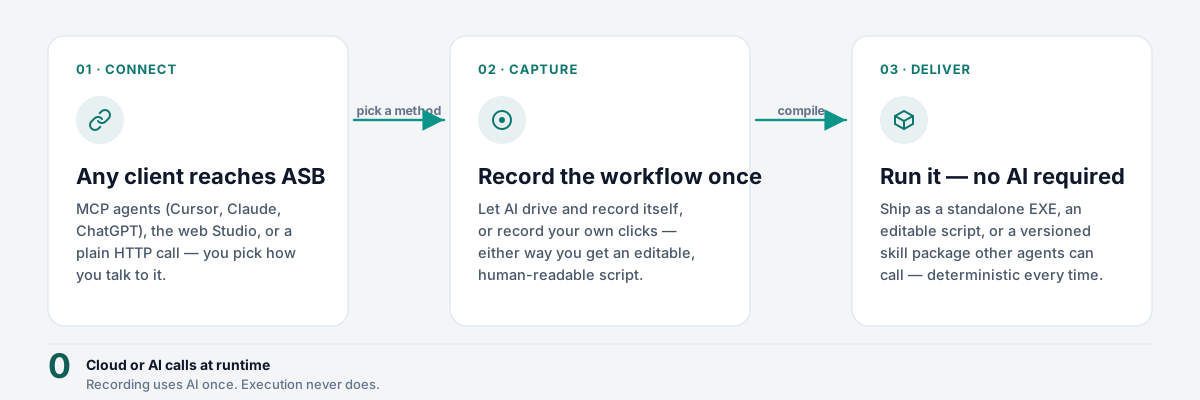
  1. Bridge ideation and execution — Capture logic and code side by side; use AI-assisted flows where they help, and keep humans in the loop for review.
  2. Respect the real stack — Desktop actions, OCR, browser automation, and HTTP services coexist in one service-oriented surface instead of five disconnected repos.
  3. Make skills portable — Package and integrate with FastSkills-oriented workflows and, when you choose, expose tools to assistants via MCP derived from your API—so AI agents call your bounded operations, not random shell.
  4. Stay operator-centric — A browser UI for day-to-day use, with clear settings, quotas, and extension points for power users.

Plain language: we built a practical control room for automation and skill packaging—not another generic “AI platform” slide deck.

What you get

High-level capabilities of the application (exact feature set evolves with releases; see the in-app UI and manual for detail).

Unified web UI

Design and run automations, manage favorites, browse marketplace-oriented skills, and configure the service from one place.

Desktop & vision

Screenshot, regional OCR, window management, and related building blocks for real-world UI automation.

HTTP API

Invoke capabilities programmatically; suitable for integration with your own schedulers, agents, or backends.

Recording & replay patterns

Workflows that help capture API-style interactions and translate intent into structured scripts where the product supports it.

Skill packaging

Package automation artifacts for deployment contexts aligned with FastSkills / MCP-style consumption.

Optional MCP

When enabled, expose selected OpenAPI operations as MCP tools so compatible assistants can call approved endpoints.

System requirements

Summarized for operators and procurement. The user manual §2.1 is authoritative for version pins, file names, and CI details.

All platforms: Python 3.10+ (release builds in CI use Python 3.11). Prefer 64-bit OS, 8 GB+ RAM for the full OCR / ML / desktop stack, and several GB free disk for dependencies and first-run model caches (e.g. .paddlex). Use a current browser for the local web UI (often http://127.0.0.1:8800).

Windows

No minimum Windows build is pinned in the repo; use 64-bit Windows 10 or later (or current Server) with a supported Python 3.10+ build.

Install requirements-windows.txt alongside the base requirements (includes pywin32 ≥ 306, PyAutoGUI, pynput, etc.). WSL counts as Linux for dependencies, not Windows.

macOS

No minimum macOS version is pinned; use a release where you can install Python 3.10+ and wheels from requirements-macos.txt (includes pyobjc and mac-specific packages).

Desktop automation needs Accessibility (and Input Monitoring if prompted) for your terminal, IDE, or packaged app—see the manual troubleshooting section.

Linux

Use requirements-debian.txt (same dependency tree as the main lockfile but without pyobjc). glibc-based 64-bit distros—especially Ubuntu / Debian—are the easiest path; others may need extra work for Paddle/PyTorch wheels.

Tray/splash GUI needs a graphical session (DISPLAY). For servers, run with --no-gui when you only need HTTP.

Packaged binaries are produced on GitHub Actions with windows-latest, macos-latest, and ubuntu-latest—see .github/workflows/build.yml.

Support model

Two lanes—so expectations stay clear whether you are evaluating, self-hosting, or running under a commercial agreement.

Community & as-is use

The software may be used and inspected according to its license and repository terms. Documentation, issues, and community discussion (where offered) are provided without warranty: no guaranteed response time, no SLA, and no obligation to implement feature requests.

Best for: tinkerers, internal pilots, and teams comfortable reading logs, updating dependencies, and owning their runtime.

Professional support

For organizations that need onboarding, priority help, custom integrations, security review assistance, or deployment hardening, commercial support may be available from the maintainer or partners.

Scope, channels, and SLAs are defined in a separate agreement—not on this marketing page. Contact your vendor or project owner for entitlement and pricing.

This site is informational. It does not constitute a service contract. Always verify support terms in writing before relying on them for production.

User guide (quick path)

For install, navigation, settings, scenarios, API/MCP notes, and troubleshooting, use the detailed user manual shipped with the repository.

  1. Install Python 3.10+, create a virtualenv, and install OS-appropriate requirements (requirements.txt plus platform files where provided). See System requirements for Windows / macOS / Linux notes.
  2. Run the FastAPI application (e.g. python main.py); default HTTP is often http://127.0.0.1:8800/ unless you override AUTOMATION_SERVICE_PORT.
  3. Open the web UI in a browser, complete first-run settings (language, services, quotas) as needed.
  4. Automate using the capability catalog, code panel, favorites, and FastSkills-oriented flows.
  5. Integrate via HTTP; enable MCP only when you understand which tools are exposed and to which clients.

Open full manual

Questions & answers

Short answers; the manual remains authoritative for operational detail.

Is this a hosted SaaS?
No. It is designed primarily as a self-hosted application you run on your infrastructure or workstation. You control networking, TLS, and who can reach the service.
Do I need MCP or FastSkills?
No. Core features work over the web UI and HTTP API. MCP and FastSkills are optional integration paths when you want assistants or a skill runtime to consume packaged capabilities.
Does the AI in the product replace my team?
It assists with drafting, analysis, and skill design where enabled—it does not remove the need for review, testing, security judgement, or operational ownership. Treat AI outputs as suggestions.
What about data privacy?
Sensitive data flows depend on your configuration: local execution, which models you call, and which external services you enable. Run data-protection assessments before processing regulated data.
Why local-first?
Many automation tasks touch the desktop, filesystem, or internal APIs. Keeping execution close to the environment reduces latency and can simplify compliance—at the cost of you maintaining the runtime.
Can I embed the UI in VS Code?
A separate optional extension project in this repository can open the web UI inside an editor panel via a webview (requires the HTTP service to be running). See vscode-embedded-ui/ in the repo.
What if OCR or vision is slow the first time?
Vision stacks often download models on first use. Expect a longer cold start; subsequent runs are typically faster. See the manual for warmup and skip flags.
Who answers my support email?
Community / as-is: use public channels if available; no promise of response. Professional: per your contract with whoever sold or supports your deployment.