
Product blog
3rd party MCP usage and integration for the Automation Skill Builder
A step-by-step, security-conscious approach to MCP alongside practical patterns for your own tooling.
We continuously observe MCP capabilities in the wider ecosystem. When a capability is genuinely required from a product and security perspective, we plan to fold it into the official product map with the same rigor we apply to the rest of the control plane.
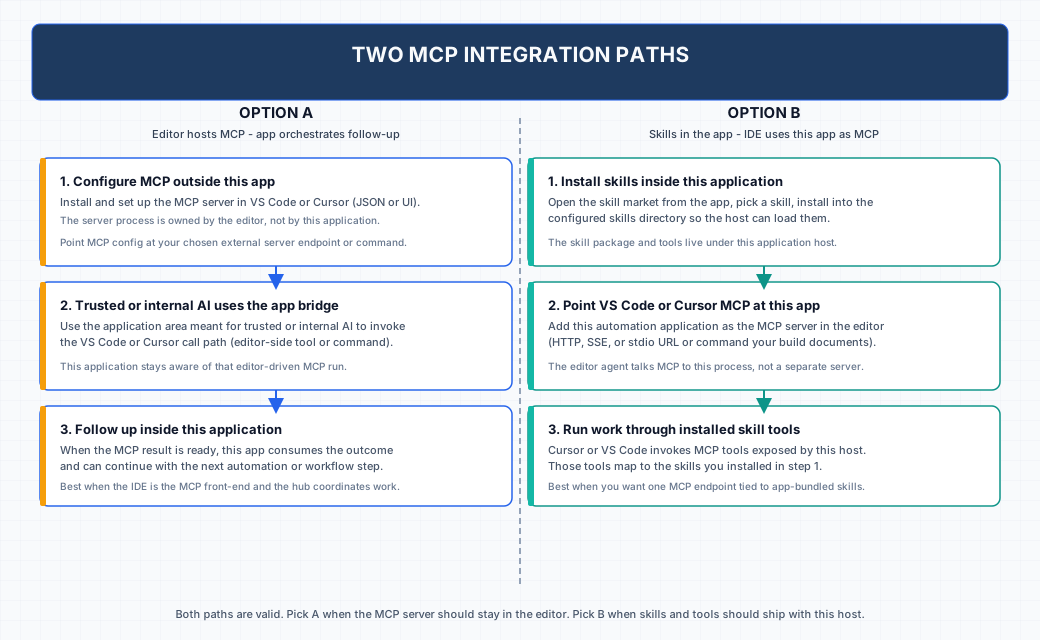
Until a given integration reaches that bar, you may still have individual workflows where a third-party MCP is valuable. The diagram below summarizes two supported patterns so you can connect external tooling without waiting for a formal product release.
Both options assume you understand the trust boundary of each MCP server you enable. Follow your organization policies for secrets, network egress, and editor configuration.
Option A: editor-hosted MCP
Install and configure the MCP server in VS Code or Cursor itself. Then use the area of Automation Skill Builder intended for trusted or internal AI to invoke the editor-side call path. The application remains aware of that MCP-driven run and can take the next automation step once a result is available. This fits teams that want the IDE to own the MCP process while the hub coordinates follow-up work on the host.
Option B: this application as MCP host
Use the in-app skill market to install skills into the configured skills directory. Point VS Code or Cursor MCP settings at Automation Skill Builder as the MCP server (per your deployment: HTTP, SSE, stdio, or documented command). The editor agent then calls tools exposed by this host, which map to the skills you installed. This fits teams that want one MCP endpoint tied to packaged skills and the same broker you already run for automation.